

The Tools You Need to Run a Paid Community
Running a paid community often looks surprisingly simple from the outside. People join a Discord server, pay a monthly membership, interact with other members, and occasionally attend an event or ask a question.
Behind the scenes, however, there is usually much more happening.
- Payments need to be processed.
- Members need to receive the correct roles.
- Expired subscriptions need to remove access automatically.
- New members need to be welcomed and guided toward value.
- Community owners need to understand which members are active, which ones are drifting away, and where people tend to disappear during their journey.
Very little of this happens by itself.
Discord is an excellent place to host conversations, but it was never designed to manage every aspect of running a paid membership business. As communities grow, owners usually discover they need additional tools that handle the operational side of the experience.
The good news is that this does not mean building a complicated software stack with dozens of different applications. Instead, most successful paid communities rely on a handful of tool categories, with each one solving a specific problem.
- Some tools collect payments.
- Others control access.
- Some help onboard members.
- Others provide visibility into how the community is performing over time.
The goal is not to accumulate as many tools as possible. It is to remove repetitive work, reduce manual errors, and give community owners more time to focus on the thing members actually care about: the community itself.
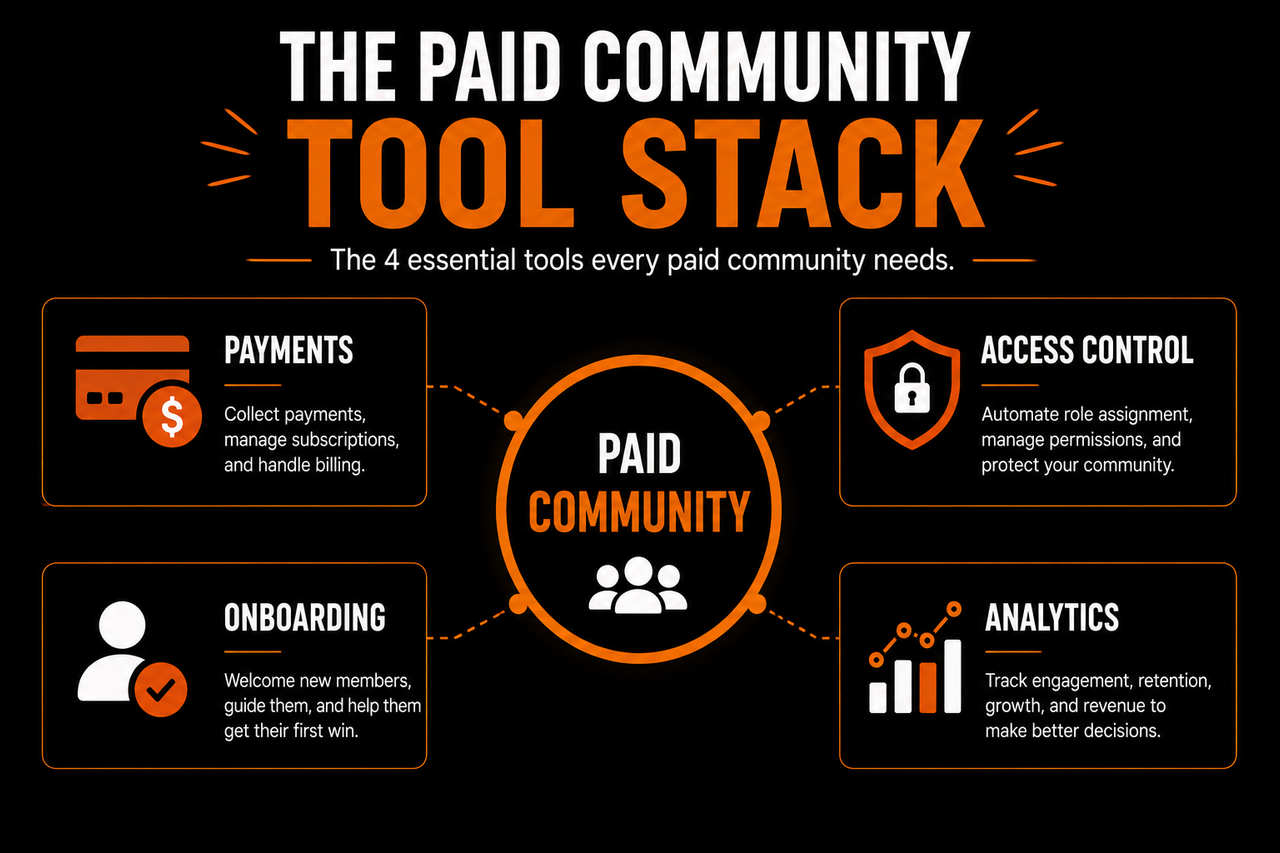
This guide walks through the four categories of paid community tools that become increasingly valuable as your community grows and explains what each one should actually do.
What Paid Community Tools Actually Do
When people first launch a paid community, they often assume Discord is the tool.
In reality, Discord is the platform where members interact. Running a successful membership business requires supporting systems around those conversations.
Think about a physical gym.
The gym itself is where members exercise, attend classes, and meet other people. But the business also needs software to process memberships, manage entry, communicate with members, schedule sessions, and understand retention.
A paid community works much the same way. Discord is the environment where members spend their time, but the business surrounding that environment needs additional support.
That does not mean every community immediately needs sophisticated software. A community with twenty members can often manage many things manually. The owner might personally approve new members, answer every onboarding question, and remember who has shown interest in upgrading.
As membership grows, those manual processes begin to break down. Instead of spending time building the community, owners spend their time maintaining it.
That is where tools become valuable.
They are not replacing the human side of community management. They are removing repetitive administrative work so community managers can spend more time helping people.
Every Tool Should Solve a Specific Problem
One mistake many new community owners make is choosing software because it has an impressive list of features.
Features rarely solve problems on their own.
Instead, begin by identifying the friction inside your community. Ask questions like:
- Are members struggling to pay?
- Is role assignment taking too much time?
- Do new members get lost after joining?
- Is it difficult to know who needs a follow-up?
- Are you guessing whether engagement is improving?
Each of these problems points toward a different category of tool.
Notice that none of those questions ask:
Which software should I buy?
Instead they ask:
What problem am I trying to solve?
That mindset leads to a much cleaner tool stack because every addition has a purpose.
Tools Should Make the Community Feel More Human
This may sound backwards.
Automation is usually associated with removing people from a process.
In healthy communities, it often does the opposite.
Imagine manually welcoming fifty new members every week. By the time you've copied and pasted welcome messages, assigned roles, answered the same questions repeatedly, and updated spreadsheets, you have very little energy left for meaningful conversations.
Now imagine those repetitive tasks happening automatically.
- New members receive the correct access.
- Welcome messages are delivered instantly.
- Basic guidance is available immediately.
- Payment status updates without manual intervention.
Instead of replacing human interaction, automation creates more time for it. The community owner can spend their energy answering thoughtful questions, joining discussions, hosting events, and helping members succeed instead of performing administrative work.
That is what good community tools should accomplish.
They should make the experience feel more personal, not less.
Keep the Stack as Simple as Possible
It is surprisingly easy to overcomplicate a community before it has enough members to justify it.
Some owners spend weeks connecting automation platforms, dashboards, reporting tools, CRM systems, AI assistants, and analytics software before the first paying member even arrives. That usually creates more maintenance than value.
A better approach is to let your needs determine your tools.
- If payment management is becoming difficult, solve payments.
- If onboarding becomes inconsistent, improve onboarding.
- If members are quietly disappearing, improve visibility into the member journey.
Grow the stack gradually as the community grows. This also makes it much easier to replace individual tools later because each one performs a clearly defined job. Instead of depending on one massive platform for everything, each part of your system remains focused on solving a single problem well.
Think in Categories Instead of Products
Community owners often ask questions like:
What's the best software for paid communities?
There usually is not a single answer. Different communities have different workflows, budgets, and priorities.
Instead of searching for one perfect platform, it helps to think about categories.
Most paid communities eventually need tools that help with:
- Collecting payments.
- Managing member access.
- Welcoming and onboarding members.
- Tracking engagement and retention.
The exact products may change over time.
- New tools appear.
- Existing tools improve.
- Your workflow evolves.
The categories remain remarkably consistent.
If each category is covered effectively, your community operations become significantly easier to manage without making the technology the center of the experience.
The technology should remain mostly invisible to members. They simply experience a community that feels organized, responsive, and easy to navigate.
That is exactly what the right tool stack is supposed to create.
As communities mature, the first category most owners encounter is also one of the most important: how members actually pay for access and how that access is managed automatically.
Payments and Access Control
The moment someone decides to become a paying member, your community enters a completely different phase.
Until that point, most of the experience has been about discovery. The member has consumed your content, explored your community, built trust, and decided that the deeper experience is worth paying for.
Now they expect something very simple:
- They pay.
- They join.
- They get access.
If any part of that process feels confusing or unreliable, the first impression of your paid community suffers immediately. That is why payments and access control are usually the first operational systems community owners invest in.
Not because they are exciting, but because they form the foundation of the entire membership experience.
Collecting Payments Is Only the Beginning
Most people think payment software has one responsibility:
Take someone's money.
In reality, payment processing is only the first event in a much larger workflow. Once a payment succeeds, several other things usually need to happen.
- The member should receive access.
- Their Discord role should update.
- Any onboarding process should begin.
- The community team may need to be notified.
- The member's subscription status should be recorded.
The smoother this sequence feels, the more professional the community appears. Members should never feel like they have entered a manual approval process after completing a purchase. Ideally, the transition from customer to member happens almost instantly.
That immediate access reinforces the excitement someone felt when they decided to join.
Membership Status Should Control Access
One of the biggest operational mistakes in growing communities is managing access manually.
Imagine checking every payment notification yourself. Every new subscriber requires you to open Discord, find the correct username, assign the appropriate role, and verify everything worked.
Now imagine doing that several times every day.
Eventually mistakes happen.
- Someone pays but waits hours for access.
- Another member cancels but accidentally keeps premium permissions.
- Someone upgrades but continues seeing the old channels.
None of these problems are difficult individually.
The issue is that they repeat.
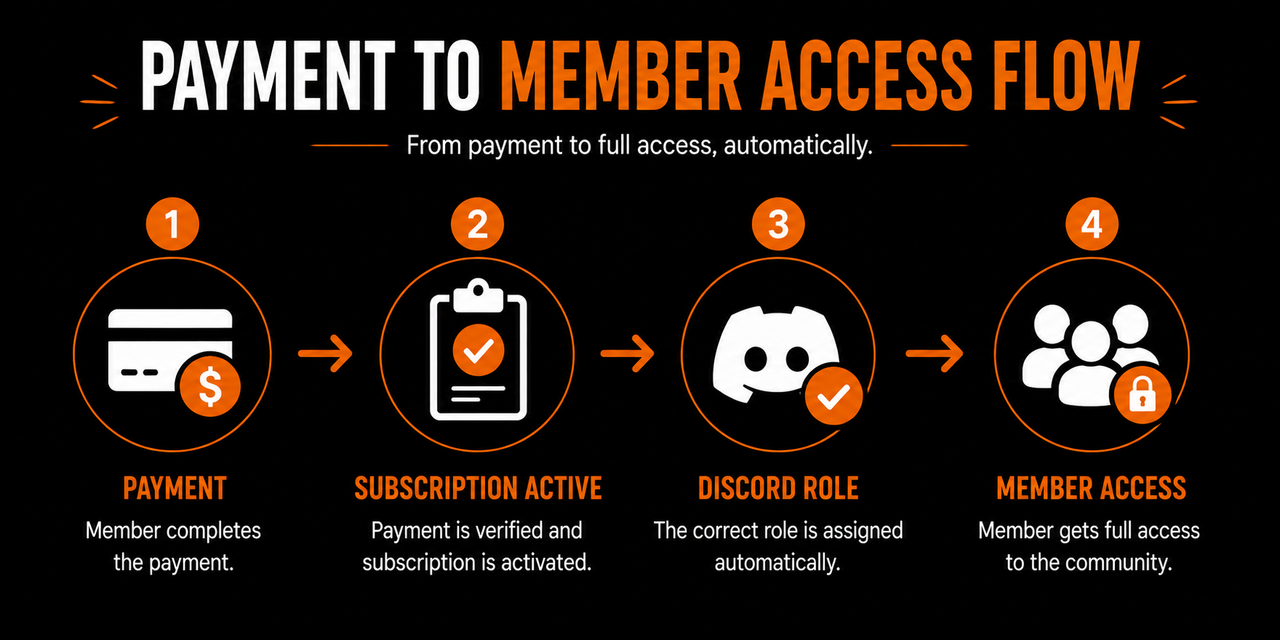
Instead of asking a moderator to remember who should have access, modern paid communities allow membership status to control permissions automatically. The workflow becomes simple:
Payment → Active Membership → Correct Discord Role → Access Granted
If the subscription changes, the permissions change with it. That keeps access consistent without creating extra administrative work.
Keep Permission Structures Simple
Discord provides extremely detailed permission controls. Almost every channel can have different visibility rules, posting permissions, reactions, voice access, and moderator settings.
While that flexibility is powerful, it also creates opportunities to overcomplicate the server. The simplest permission systems are usually the easiest to maintain.
Onboarding and Member Nurturing
- A member successfully pays.
- They receive the correct Discord role.
- The premium channels become visible.
From a technical perspective, everything worked perfectly.
But from the member's perspective, the journey has only just begun.
Many paid communities lose members not because the product is poor, but because nobody helps those members become part of the community after they join. The first few days are often the most important period in a member's lifecycle.
- People are excited.
- They want to explore.
- They want to understand what they paid for.
- They are deciding whether the membership feels valuable.
Good onboarding tools help answer those questions before uncertainty turns into inactivity.
Unlike payment software, which manages transactions, onboarding tools manage first impressions. And unlike Discord itself, they help community owners understand where each member is in their journey instead of treating everyone exactly the same.
Onboarding Is More Than a Welcome Message
Many communities believe onboarding ends after sending a welcome message.
In reality, that message is only the beginning.
A good onboarding process answers several important questions for every new member:
- Where should I start?
- What should I do first?
- Which channels matter most?
- Who should I talk to?
- What is expected of me?
- How do I get value from this membership?
Without those answers, new members often do what most people do when entering an unfamiliar environment.
They quietly observe.
Sometimes they stay.
Sometimes they disappear before participating at all.
That is why onboarding should gradually reduce uncertainty instead of overwhelming members with information. Rather than explaining every channel, bot, event, and community rule immediately, onboarding should guide members toward their first successful interaction. That interaction could be:
- Introducing themselves.
- Asking their first question.
- Downloading an important resource.
- Joining an event.
Small successes create momentum.
Momentum creates participation.
Participation creates retention.
Every Member Arrives With Different Goals
One challenge communities face is that no two members join for exactly the same reason.
- Someone might be completely new to the topic.
- Another member may already have years of experience.
- Someone joins for networking.
- Someone else wants accountability.
- Another person primarily wants educational resources.
Treating every new member identically often means helping nobody particularly well.
This is where onboarding becomes more than simply delivering information. It becomes an opportunity to understand the member.
Simple onboarding questions can reveal valuable context:
- Why did they join?
- What are they trying to accomplish?
- What experience level are they at?
- Which part of the membership interested them most?
Those answers help community owners provide more relevant guidance from the very beginning. Instead of pointing everyone toward the same resource, members can naturally find the parts of the community that matter most to them.
That creates a more personal experience without requiring moderators to manually interview every newcomer.
Member Nurturing Is What Happens After Onboarding
Many owners think onboarding ends after the first day.
The stronger communities treat onboarding as the beginning of a longer process.
People do not become long-term members because they completed an introduction channel. They become long-term members because they continue finding reasons to return.
That requires nurturing.
Member nurturing is not about constantly selling.
It is about maintaining the relationship after the initial excitement fades.
That might include:
- Checking in with inactive members.
- Highlighting useful discussions.
- Recommending relevant resources.
- Inviting members to upcoming events.
- Celebrating milestones.
- Encouraging participation at the right moments.
These interactions help members remain connected without making the community feel like it constantly demands attention.
Instead of asking:
How do we get members to log in today?
Healthy communities ask:
How do we keep helping members move forward?
That subtle difference changes how communication feels. Members experience guidance instead of marketing.
Visibility Matters More Than Volume
As communities grow, another challenge appears. Remembering individual member journeys becomes impossible.
At twenty members, the owner might remember:
- Who joined recently.
- Who asked about coaching.
- Who is highly active.
- Who has gone quiet.
At two thousand members, that knowledge disappears.
People become usernames. Messages become conversations scattered across dozens of channels.
Without additional visibility, every interaction begins from zero.
- Someone asks another question and nobody remembers they asked the same thing last month.
- Someone quietly stops participating and no one notices until they cancel.
- Someone has been consistently engaged for six months but receives exactly the same communication as someone who joined yesterday.
This is where member management tools begin creating real value. Instead of focusing only on conversations, they help community teams understand the people behind those conversations.
Why Communities Eventually Need a CRM
Customer Relationship Management—better known as CRM—is usually associated with sales teams.
For communities, the concept is much simpler.
A CRM helps preserve context. Imagine opening a member profile and immediately understanding:
- When they joined.
- Their membership status.
- Why they joined.
- Which onboarding stage they completed.
- What they are interested in.
- How active they have been recently.
- Whether someone on the team should follow up.
That context fundamentally changes community management. Instead of treating everyone identically, moderators can understand each member's journey.
- Someone who joined yesterday needs different guidance than someone who has been participating for a year.
- Someone returning after several weeks away may need encouragement rather than another onboarding message.
- Someone who repeatedly asks about advanced topics may be ready for deeper programs or coaching.
The relationship becomes continuous rather than fragmented.
Where SalesGenie Fits
This is exactly the problem SalesGenie is designed to solve.
Most communities already have software that processes payments. Discord already provides the place where conversations happen. The missing piece is often understanding what is happening with individual members over time.
SalesGenie sits between onboarding and long-term member management. Instead of simply recording who joined, it helps community owners build context around every member's journey. That can include:
- Capturing onboarding information.
- Tracking member progression.
- Identifying inactive members.
- Recording important interactions.
- Organizing follow-ups.
- Helping community teams understand where members are in their lifecycle.
Rather than replacing Discord, SalesGenie complements it.
Discord remains the place where the community lives.
SalesGenie provides the visibility needed to manage that community more effectively as it grows.
The result is that community managers spend less time searching through messages or spreadsheets and more time having meaningful conversations with the right members at the right time.
Technology Should Support Relationships
It is easy to worry that more software will make communities feel less personal.
The opposite is usually true.
When repetitive administrative work disappears, moderators gain more time to actually interact with people. Instead of manually assigning roles, updating spreadsheets, searching message history, and remembering who needs attention, they can focus on conversations.
The technology quietly handles the repetitive work.
The humans handle the relationships.
That distinction is important. Members rarely stay because a community has sophisticated automation.
They stay because they feel noticed, supported, and connected. The tools simply make delivering that experience possible at scale.
Good Communities Remember Their Members
Think about your favorite local café.
- The owner remembers your name.
- They remember what you usually order.
- They ask about something you mentioned last week.
That experience feels personal because the relationship continues instead of restarting every visit.
Communities work the same way. As membership grows, remembering every interaction becomes unrealistic without help.
- Good onboarding systems introduce members properly.
- Good nurturing systems keep them engaged.
- Good member management tools preserve the context that would otherwise disappear.
Together, they allow communities to grow without losing the personal experience that attracted members in the first place.
But even with excellent onboarding and nurturing, community owners still need to answer one important question:
Is any of this actually working?
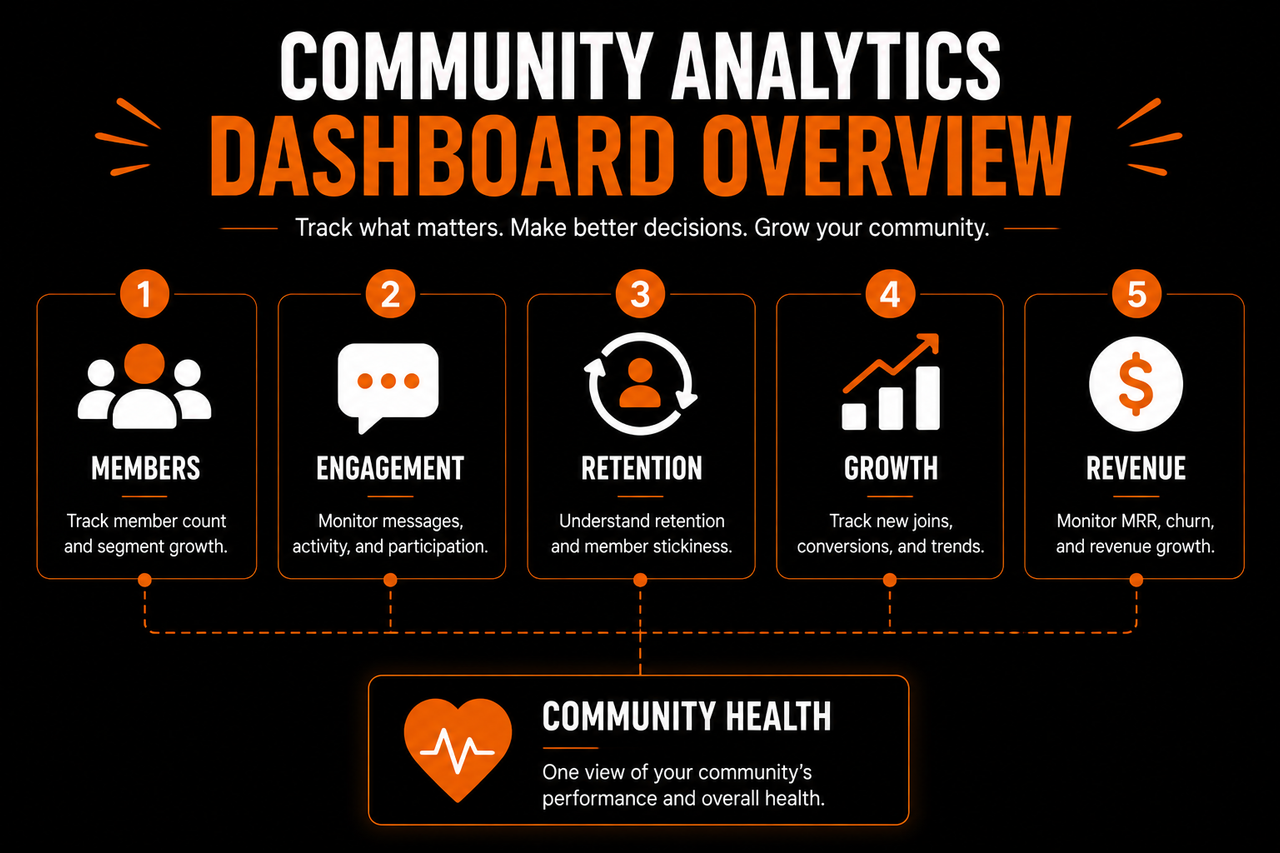
That requires another category of tools entirely—analytics that help measure engagement, retention, and the overall health of the community rather than relying on assumptions alone.
Tracking What's Working
Building a paid community is not only about attracting new members. It is about understanding whether the experience you have created continues delivering value after people join.
That becomes increasingly difficult to judge through instinct alone. When a community is small, owners naturally notice almost everything.
- They recognize familiar names.
- They remember who recently joined.
- They know who attends every event and who has not been active for a while.
As membership grows, that awareness gradually disappears.
- Conversations happen simultaneously across multiple channels.
- New members arrive every day.
- Some people quietly consume content without posting.
- Others become highly active before disappearing without explanation.
At that point, community management becomes less about remembering individual members and more about identifying meaningful patterns. That is exactly where analytics and reporting tools become valuable.
They help answer an important question:
Is the community actually becoming healthier over time?
Good Analytics Tell Stories, Not Just Numbers
- Most community platforms can tell you how many members joined.
- Many can show how many messages were sent.
- Some will even display daily activity graphs.
Those numbers are useful, but they rarely explain whether the community is succeeding.
Imagine seeing this report:
- 1,200 members
- 8,000 messages this month
- 400 new joins
At first glance, everything appears healthy.
But those numbers alone cannot answer questions like:
- Are new members staying?
- Are conversations actually helpful?
- Are paying members renewing?
- Do newcomers understand where to start?
- Are people participating consistently after their first week?
The difference is subtle but important.
Large numbers describe activity.
Meaningful metrics describe the member experience.
That is why community analytics should always be interpreted in the context of the member journey rather than viewed in isolation.
Follow the Member Journey
One of the most useful ways to think about community analytics is to follow members through each stage of their lifecycle. Instead of asking whether the community is active overall, ask what happens at each step.
For example:
Discovery
- How many people accept the invitation?
Onboarding
- How many complete the onboarding process?
- How many introduce themselves?
Early Engagement
- How many members ask a question during their first week?
- How many attend their first event?
Long-Term Participation
- How many members remain active after one month?
- How many renew their memberships?
Looking at the community this way helps identify where members begin dropping away. Perhaps:
- Many people join but never introduce themselves.
- Onboarding works well, but very few members attend live sessions.
- Engagement is strong, yet renewal rates remain lower than expected.
Those patterns are far more actionable than simply knowing how many messages were sent yesterday.
Measure Engagement Carefully
Engagement is one of the most misunderstood community metrics.
Many owners immediately look at message counts. More messages often seem like a healthier community.
Sometimes they are.
Sometimes they are not.
A thousand short messages can provide less value than twenty thoughtful discussions. Likewise, not every valuable member contributes in the same way.
- Some members answer questions.
- Some provide detailed feedback.
- Some attend every event.
- Others quietly consume educational resources before applying what they learn.
Someone may rarely post while still renewing their membership because the community continues helping them achieve their goals. For that reason, engagement should be viewed broadly.
Instead of asking:
How many messages were sent?
Ask questions like:
- Are members returning regularly?
- Are conversations receiving replies?
- Are questions being answered?
- Are people attending events?
- Are members building relationships with each other?
These signals provide a much more balanced view of community health.
Retention Is Usually the Strongest Indicator
If there is one metric that deserves particular attention, it is retention.
A community can attract hundreds of new members every month. If those members consistently leave after a short period, something in the experience needs attention.
Retention reflects the entire member journey:
- Good onboarding.
- Useful conversations.
- Helpful moderation.
- Meaningful relationships.
- Clear expectations.
Each of these improves retention. No single feature keeps members subscribed. Instead, renewal usually happens because the overall experience continues delivering value.
This is why experienced community operators often care more about retention than rapid growth.
Growth fills the community.
Retention strengthens it.
When both happen together, communities become much more sustainable.
Analytics Should Help You Improve
Reporting is only useful when it influences decisions.
Imagine discovering that members who introduce themselves within their first two days remain active significantly longer than those who never do. That insight might encourage you to redesign onboarding around making introductions easier.
Or perhaps event attendance is much higher than expected while resource downloads remain low. That could suggest members value live interaction more than large content libraries.
The purpose of analytics is not to produce attractive dashboards.
It is to answer practical questions.
What is working?
What is not?
What should we improve next?
Every useful metric should point toward an action rather than simply becoming another number to monitor.
Community Analytics Go Beyond Discord
Discord itself provides visibility into activity happening inside the server.
But paid communities often involve much more than Discord alone. Members:
- Purchase subscriptions.
- Complete onboarding.
- Attend workshops.
- Download resources.
- Renew memberships.
- Sometimes purchase additional products or coaching.
Understanding the complete member journey therefore requires looking beyond individual Discord channels. Community owners benefit from seeing how these different parts connect.
For example:
A member joins after watching a YouTube video. They complete onboarding. They attend two live events. They become inactive for several weeks. A check-in message brings them back. Several months later they renew their membership.
- Looking only at Discord messages would miss much of that story.
- Looking only at payment data would miss the conversations.
- Looking only at event attendance would miss everything happening between those sessions.
The strongest reporting connects these different touchpoints into one overall picture of the member experience.
Combine Data With Human Insight
Numbers are excellent at identifying patterns.
People are excellent at explaining them.
Suppose cancellations suddenly increase.
Analytics reveal the trend.
Conversations with members explain why.
Perhaps:
- Expectations were unclear.
- Members achieved their goals and no longer needed the community.
- Onboarding became confusing after recent changes.
The data highlights where attention is needed.
The conversations reveal what should actually change.
Strong community teams rely on both.
Neither should replace the other.
Build a Stack That Serves Members
Every category of tool discussed throughout this guide exists for one reason:
To improve the member experience.
- Payment tools remove friction during sign-up.
- Access control ensures members receive what they paid for.
- Onboarding and member management help people become part of the community instead of quietly disappearing.
- Analytics reveal where the experience can continue improving.
Notice that none of these tools are the community itself. Members stay because of the people they meet, the conversations they have, the progress they make, and the relationships they build. The software simply makes those experiences easier to deliver consistently as the community grows.
That is ultimately what the best paid community tools have in common.
They do not try to replace community management.
They remove repetitive operational work so community owners can spend more time doing the work that actually matters: helping members succeed.
When your technology quietly handles payments, access, onboarding, member tracking, and reporting in the background, your attention can stay where it belongs—building a community that people are genuinely excited to remain part of month after month.
For many communities, the basic structure is enough:
- Staff
- Free Members
- Paid Members
Additional tiers should only exist when they represent genuinely different experiences. For example, a coaching membership might include:
- Community
- Pro
- VIP
Each tier unlocks something meaningfully different.
What should be avoided is creating multiple roles simply because the software allows it. More roles mean more permission combinations. More permission combinations create more opportunities for confusion.
Members should not need to understand your permission architecture to enjoy the community. They should simply receive the access that matches their membership.
Handle Membership Changes Automatically
Joining is only one stage of the member lifecycle. Communities also need to manage:
- Renewals.
- Failed payments.
- Cancellations.
- Upgrades.
- Downgrades.
- Returning members.
Each of these events affects what someone should be able to access.
Suppose a member upgrades from a standard membership to a premium coaching tier. Their experience should change immediately. Likewise, if a subscription expires, premium-only channels should no longer be available while any free access remains intact.
Automating these transitions removes uncertainty for both the member and the community team.
Members always receive the experience their membership currently provides.
Moderators no longer need to manually adjust permissions every time someone's subscription changes.
Security Matters More Than Convenience
Paid communities contain something valuable. That value might be exclusive discussions, educational material, networking opportunities, coaching sessions, or premium resources.
Because members are paying for access, protecting that access becomes important. A reliable membership system should make it difficult for people to keep premium access after cancelling or bypass membership requirements altogether.
This is another reason automated access control is valuable. Instead of relying on someone remembering to remove permissions, access is determined by the current subscription status.
That creates consistency.
It also creates fairness.
Paying members know the community they're investing in is being managed properly.
Choose Tools That Work Together
The payment system and Discord should not feel like two completely separate worlds. The best experience happens when information flows naturally between them.
- Someone pays.
- Their account connects.
- Their Discord role updates.
- The onboarding begins.
Everything feels like one continuous experience.
When systems do not communicate properly, community owners often compensate with manual work.
- Someone exports payment data into a spreadsheet.
- Another moderator updates Discord roles.
- Someone else tracks cancellations separately.
Each additional manual step increases the chance of mistakes.
Instead, look for tools that naturally connect payments with membership management.
The goal is not simply processing transactions.
It is creating a reliable membership lifecycle from the moment someone subscribes until the day they eventually renew, upgrade, or cancel.
Payments Are Operational—Relationships Are Not
It is worth remembering that payment software only manages transactions.
It does not build relationships.
- A member paying successfully does not automatically understand where to start.
- Receiving a Discord role does not make someone feel welcomed.
- Unlocking premium channels does not guarantee participation.
Payments and access control simply remove friction. They create the conditions for a great community experience.
What happens after that depends on how well new members are introduced to the community itself. That is where the next category of tools becomes just as important.
Once someone has access, the focus shifts from getting members into the community to helping them become part of it through effective onboarding, guidance, and ongoing member nurturing.
What You Should Do Next
If you're just getting started, resist the temptation to build an elaborate tech stack on day one.
Start with the essentials:
- A reliable way to collect payments.
- A system that automatically manages Discord access.
- A simple onboarding process that helps new members find value quickly.
- Basic visibility into member activity and retention.
As your community grows, your tools can grow with it.
The important thing is that every tool solves a real problem rather than adding unnecessary complexity.
Remember that members do not join communities because of the software behind them.
They join because they want to learn, connect with others, receive support, or make progress toward a goal.
The right tools simply make it easier for you to deliver that experience consistently.
Build the community first.
Then let your technology support the relationships you're creating, not replace them.